Who's Online
Translate Site
Bookmark Us


We make state of the art music software for recording and editing digital audio music. Our software turns your computer into a virtual professional recording studio, replacing thousands of dollars worth of hardware. Our products are designed for use by home audiophiles, musicians, post-production engineers, Web designers, game programmers, recording studios, schools and music departments, and are particularly useful for making sound tracks for TV and video, multimedia presentations, streaming audio from the Internet, and MP3 file compression.You can perform vinyl restoration (noise removal), use our audio recording and editing software, which includes our DirectX plugin software, our mp3 and wma recording and editing software and mp3 id3 tag editor (with our edit and normalize mp3 files software), to record mp3 files (record, edit, and normalize mp3 and wma files), remove vocals, mix tracks, add special effects, and much more. Use our karaoke software, professional hearing test software, midi sequencer, music mastering software, celestial navigation software, and DJ software to great advantage. We also do Custom Programming and Custom Music Composition and Custom Web Design at extremely affordable rates. Download and try out our programs for free.
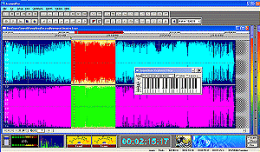
TsunamiPro turns your computer into a professional recording studio. An award winning state of the art professional quality recording and editing program, yet it's very simple to use. It has many more features than the closest competition, yet it only costs a fraction as much. The program works with all versions of Windows and with Apple iTunes. You can record from a microphone, a CD / DVD player, a midi sequencer, or any other device connected to your computer's sound card. Files can be saved in a wide variety of different formats, and can readily be burned to a CD. The editing functions are very powerful and allow you to remove noise (vinyl restoration), remove vocals from sound tracks (Karaoke), add special effects, normalize files, and perform a whole host of other operations, described below. It comes with built-in tutorials and with extensive help files. You can download the demo version and try it out for free. Some of the many features are listed below.
|
 TsunamiPro